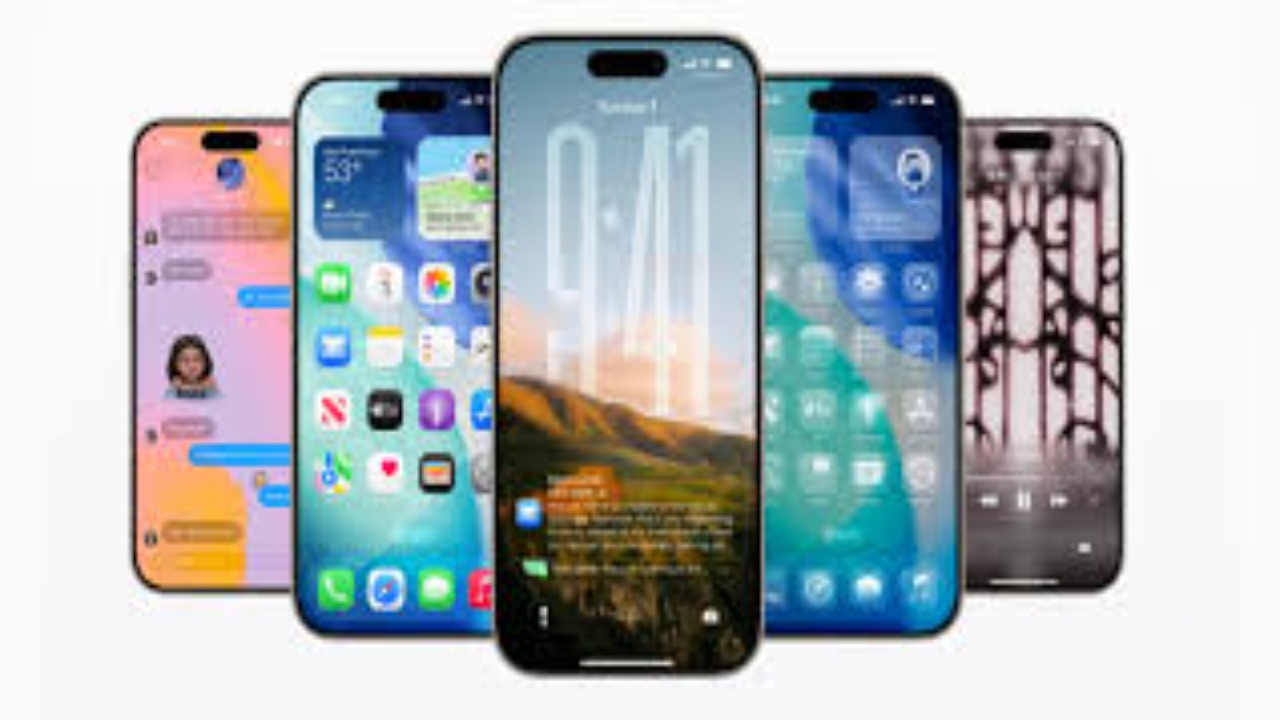
Apple has just introduced iOS 26 beta, and it’s more than just a software update, it’s a complete visual and functional overhaul. At the annual WWDC 2025, Apple pulled back the curtain on its most ambitious iPhone redesign since iOS 7, calling it the “broadest design update ever.”
But what makes this version so special? And why did Apple skip ahead from iOS 17 to iOS 26? Let’s break it down in a way that’s easy to understand, even if you’re not tech-savvy.
Why Is It Called iOS 26?
Instead of launching iOS 18 or 19, Apple decided to align the naming with the year 2026. Now, all its platforms follow this format, including iPadOS 26, macOS 26, and more. The idea is to make it easier for users to identify the latest software based on the year of release.
This isn’t just a cosmetic change. With iOS 26 beta, Apple is signaling a fresh chapter for its entire ecosystem.
iOS 26 Beta Release Date
The iOS 26 beta release date for developers was June 9, 2025, right after the WWDC keynote. If you’re part of the Apple Developer Program, you can access it immediately.
For everyone else, the iOS 26 beta download will be available through the Apple Beta Software Program starting July 2025. That’s when the public beta will roll out, giving iPhone users a chance to explore the future before the official fall release.
iOS 26 Beta Features: What’s New and Exciting
Here’s a look at iOS 26 all features that are creating a buzz:
1. Liquid Glass Design: A Stunning New Look
The entire operating system now uses a new material called Liquid Glass. It’s sleek, semi-transparent, and gives everything, from widgets to icons, a modern, polished look. You can even switch between light, dark, and a new all-clear mode that puts the focus on your content.
2. Rounded Icons and Updated Home Screen
Apple has brought in rounded icons and tweaked the layout to create a more uniform visual style. It’s easier on the eyes and looks consistent across all Apple devices.
3. Live Translation on Calls and Messages
One of the most useful iOS 26 beta features is real-time translation during FaceTime calls, iMessages, and even voice calls. It doesn’t matter if the person you’re talking to isn’t using an iPhone, the feature still works.
4. Group Chat Typing Indicators
In group messages, you can now see who’s typing. This is a small but impactful feature that improves communication in busy group chats.
5. AI-Powered Suggestions and Smarter Siri
Apple is stepping into the world of artificial intelligence. With iOS 26 beta, Siri gets smarter and more contextual. You’ll also see AI-powered suggestions in messaging, email, and settings, helping you complete tasks faster and smarter.
How to Get the iOS 26 Beta Update
Steps to Install iOS 26 Beta
If you’re eager to explore iOS 26 beta features before anyone else, here’s how you can do it:
-
Join the Apple Developer Program
-
Visit developer.apple.com
-
Sign up (cost: $99/year)
-
Download the Beta Profile
-
Log in to your developer account
-
Go to the Downloads section and install the beta profile
-
Install the iOS 26 Beta Update
-
Go to Settings > General > Software Update
-
You’ll see iOS 26 beta update available. Tap Download and Install
If you’d rather wait for the public beta, visit the Apple Beta Software Program page in July, and follow similar steps, without the cost.
Why iOS 26 Beta is a Game-Changer
This isn’t just another update. The iOS 26 beta redefines the way iPhones look and function. Here’s why it stands out:
-
Modern Design: For users who found iOS becoming stale, Liquid Glass and new UI elements bring a much-needed refresh.
-
Cross-Platform Uniformity: The design matches other Apple platforms like iPad and Mac, making switching between devices seamless.
-
AI Integration: With smart tools and smarter Siri, Apple is catching up in the AI space, directly competing with Google and Samsung.
iOS 26 All Features Recap
Let’s quickly summarize the key iOS 26 beta features:
-
New Liquid Glass interface with rounded icons
-
All-clear mode along with light/dark themes
-
Live translation on calls and chats
-
Smarter AI-powered Siri
-
Group typing indicators
-
Consistent UI across all Apple devices
-
Streamlined Control Center and settings
These updates aren’t just for show, they improve how users interact with their phones every day.
Compatibility: Will Your iPhone Support iOS 26 Beta?
The iOS 26 beta update supports all iPhones from the iPhone 12 series onward. Some features may be limited on older models due to hardware constraints, but the core updates will still be accessible.
A Word on Privacy and Security
With every update, Apple emphasizes privacy, and iOS 26 is no exception. The new system uses on-device AI processing, meaning your data doesn’t leave your phone. From translations to suggestions, everything runs locally, keeping your information safe.
Final Thoughts: Should You Try the iOS 26 Beta?
If you’re tech-curious or want early access to cutting-edge features, the iOS 26 beta download is worth exploring. But remember, since it’s a beta, expect occasional bugs and app compatibility issues. It’s smart to install it on a secondary device rather than your main iPhone.
For everyone else, the official stable release will arrive in Fall 2025 with full support and performance improvements.
Conclusion
The iOS 26 beta isn’t just a step forward, it’s a leap. With its brand-new look, built-in AI tools, and smarter features, it’s setting the tone for the future of iPhones. Whether you’re downloading now or waiting for the public version, one thing’s clear: Apple is entering a bold new era.
Learn more about how OpenAI’s O3 model defied a shutdown command in this detailed report.